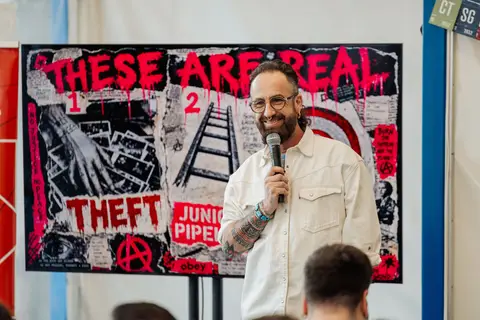
Creative Mornings Vancouver · 01 . 05 . 2026
PunkRockAI
Both hands full.
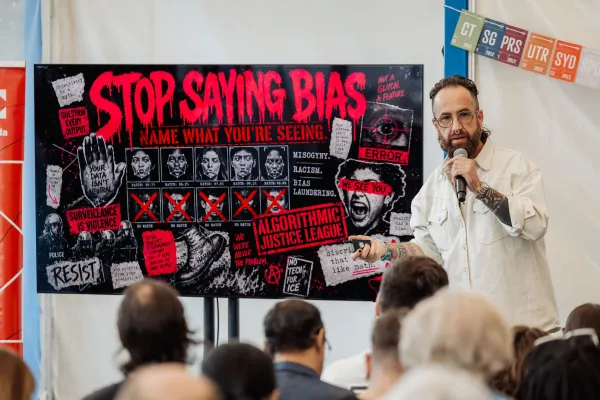
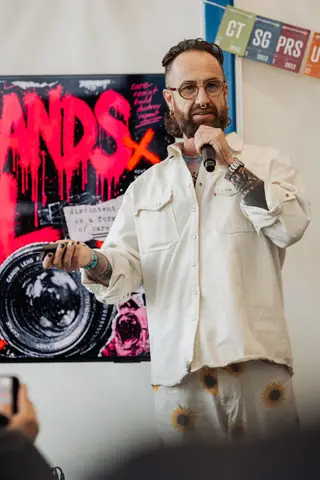
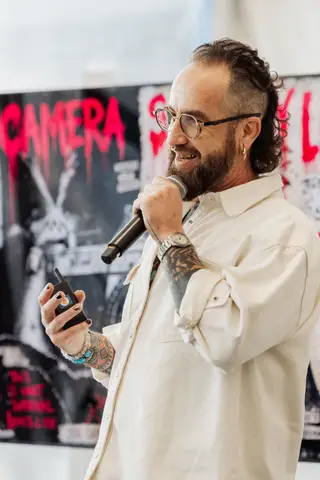
AI is trained on stolen work without consent — and many of us are also more creative than we’ve ever been. Both things can be true. The punk move is to stay in the room.
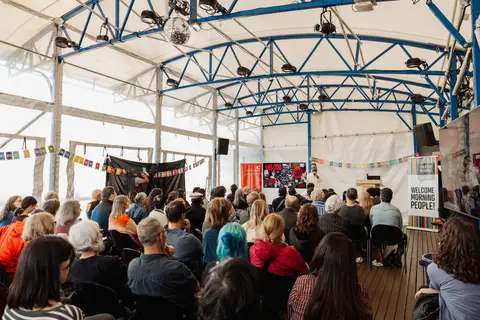
Photography — Michelle Diamond








The thesis
Name the harm. Then use the tools wrong on purpose so the story isn’t written only by people who don’t see the problem.
This site is the working portal for the talk. It is built the way the talk argues you should make things in 2026: punk-rock simple, hand-rolled, with your taste turned all the way up. No framework. No bundler. No CMS. The imagery is the spine. The widgets are the point.
Punk Rock AI is Kris Krüg’s CreativeMornings Vancouver keynote portal and a public workshop layer from the Both Hands Full practice: critique in one hand, capability in the other. The site gathers the talk, recap, photos, field course, and widgets so people can cite the work and use it without flattening AI into hype or panic.
Field notes
How we built it.
A feature-length recap of the talk, the slides, the dress rehearsal, the portal, and the room. With receipts.
Make
something.
The widgets that produce a thing you can ship. Build your stance, cut up your inputs, print your receipts.
-
01
Three documents
Personal AI policy, style guide, worldview. Externalize your taste so the machine stops giving you the average of the internet.
Build → -
02
Both hands full
Diptych canvas. Critique in one hand, capability in the other. Export the stance as a poster you can tape on a wall.
Make one → -
03
Cut-up generator
Burroughs / Dada cut-up. Paste anything. Cut by word, phrase, or line. Export the rearrangement as a poster. Arrangement is the medium.
Cut it → -
04
The Selector
Build a set list from quotes, lineage beats, and slide titles. Hit play. Every order is a different room reading.
Spin a set → -
05
Conductor
Orchestrate parallel AI instruments. Assign the score, set the tempo, pause the wrong notes. The taste stays with you.
Conduct → -
06
Voice booth
Record fifteen, thirty, or sixty seconds of yourself reading a prompt. Educational tool: see how little audio voice cloning needs. On-device only, no upload.
Record → -
07
Manifesto generator
Three prompts in. A five-paragraph manifesto out. Remix to a different template against the same inputs. Download as Markdown or plain text.
Compose → -
08
Email signature
Outlook-safe HTML signature with a rotating tagline pulled from the talk. Three copy modes (rich, raw HTML, plain).
Generate → -
09
Receipt printer
Paste AI output. Watch it print on a thermal-receipt aesthetic, line by line, optional chrr-chrr WebAudio.
Print → -
10
Détournement maker
Drop in an ad. Mark it up zine-style with text, redactions, halftone fills, accent splashes. Export the rebuttal as a PNG. The tools of spectacle, turned against the spectacle.
Mark it up →
Name
what you see.
Stop saying “bias.” The widgets here teach you to be specific about the harm. Heuristics over hand-waving.
-
01
Bias Bingo
Twenty-five categories that bias laundering hides under. Mark a cell when you’ve seen it ship. Complete a row to download the framework.
Play a card → -
02
Name what you see
Five real bias case studies with primary citations. Stop saying bias. Name what you’re seeing.
Walk through → -
03
Word-ban tester
Paste any AI output. Your style guide’s refuse list lights up the cliché. Stop letting the bot put delve in your mouth.
Scan → -
04
The tool is never neutral
Twelve cases where a design choice produced a real harm. Card-walker with primary-source citations. Pair with Anthony Joseph’s line: but neither are we.
Read the cases → -
05
Am I in there?
Paste a URL or pick a content type. The page tells you which major training corpora plausibly swept your work, and links the opt-out tools that affect what gets swept next.
Check the windows → -
06
Training-corpus receipt
Paste AI-generated text. Print a non-definitive receipt of phrase matches, hedging, em-dash density, and delve/leverage/optimize frequency.
Print tells → -
07
Taste audit
What did you throw away this week? List ten. Mark each kept or refused. Find the pattern in your refusals.
Audit → -
08
Cutting room floor
Twelve real cuts from this very talk, with the reason for each cut. Filter by reason. Steal the editorial honesty.
Browse → -
09
Junior pipeline
Two ladders side by side. The old career path. The new one with the bottom three rungs eaten by AI.
See the gap → -
10
Pattern finder
Paste your corpus. The model names the structural patterns you’ve been making for fifteen years without consciously articulating them.
Find them → -
11
Pattern cluster graph
Six eras as nodes. Cut-up, sampling, détournement, selection, reuse, refusal as edges. Hover for citations.
Trace the through-line → -
12
Chainsaws of history
Every neutral tool was a corporate spectacle until somebody used it wrong on purpose. Printing press to AI in six beats, anchored on Anthony Joseph’s line.
Pick up the tool → -
13
Mastery Gym tracker
Daily check-in. One cycle a day — try, feedback, iterate — with a streak counter, sixteen-week heatmap, and Markdown export of your last thirty cycles.
Log a cycle → -
14
Open Source Receipt
Toy estimator: how much of you is in the training data? A short questionnaire prints a paper-receipt-style heuristic. Heavily caveated.
Print the receipt →
Find
your posse.
The lifeboat is the posse. Five to twelve people you actually learn with. Plus the lineage you’re standing in.
-
01
Posse
The room you walked into. Eleven highlighted RSVPs from the May 1 audience.
Meet them → -
02
Posse builder
Force-directed graph. Add people, places, skills. See the shape of who you actually learn with in real time.
Build it → -
03
Both hands gallery
Five seed Both Hands Full diptychs from people in the room. Open any of them in the editor and remix it.
Browse → -
04
Releases wall
Public stream of /release-day submissions. The lifeboat building itself, in real time.
See the wall → -
05
Crit office
Five work kinds × five angles. Generate a structured crit prompt you can paste into any LLM, or read a worked exemplar.
Walk in → -
06
Lineage
Dada → Burroughs → xerox punks → Jamaican selectors → hip hop → AI. Every generation: corporations build, weirdos figure out what it’s for.
Walk it → -
07
Library
Sixty-plus markdown files. One search box. The whole talk is in there.
Search → -
08
Decisions
The talk’s own decision log, in public. Open questions, resolved questions, and the running session trail.
Read →
Ship
it.
The whole point is the thing you make. Pick the next move, print the workbook, watch the daily slide. May 29 is the deadline.
-
01
Release Day — May 29
Submit the thing you make to the global Release Day. Goes on the public wall. No gatekeeping, no curation.
Submit → -
02
Action chooser
Decision-tree walker. A few questions in, one concrete next action out. Routes to the widget that fits your situation.
Pick a move → -
03
Workshop kit
Four printable templates: Three Documents worksheet, Both Hands diptych, Bias Bingo card, Cutting Room audit. A4/Letter, greyscale-safe, print at home.
Print the kit → -
04
Signal — slide of the day
One slide a day, deterministic by the calendar. Refresh on a new date for a new beat from the deck.
Today’s slide → -
05
RSS feed
RSS 2.0 feed of the recap and any future field notes. Subscribe in your reader.
Subscribe →